
Dallas Semiconductor Security Key
Applicable Tool Models
Question: Which KLA-Tencor Surfscan models use the Dallas Semiconductor Security Key?
Answer: The following Surfscan wafer inspection systems use this security key module:
- Surfscan 6100
- Surfscan 6200
- Surfscan 6210
- Surfscan 6220
- Surfscan 6400
- Surfscan 6410
- Surfscan 6420
Function of the Dallas Security Key and tool location
Question: What is the Dallas Semiconductor Key used for in the Surfscan system?
Answer: The Dallas Security Key stores tool configuration and licensed options (“Tool / Options Enabled”). Location is on the GPIO circuit board located in the card cage.
- Data is stored in volatile memory
- Memory retention is maintained by an internal button-cell battery when AC power is removed
- Loss of battery power results in complete loss of licensed options
Why the Dallas Key Is a Critical Risk Item
Question: Why is this component important to system uptime?
Answer:
- Most original Dallas Keys were manufactured ~30 years ago
- The internal battery is well beyond its intended service life
- There is a high probability (≈90–95%) of failure upon Tool AC power
- Battery failure causes instant erasure of options memory
Result:
➡️ The tool becomes non-operational (“down hard”).
Mechanical Fragility of the Original Module
Question: Why does the original Dallas Key break so easily?
Answer:
- The module was designed for minimal insertion cycles
- The four external “pins” are actually bent IC leads from an 8-pin device
- Repeated insertion, removal, or handling frequently results in lead fracture
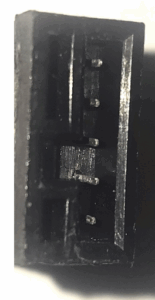
Old Pin Style
BSI Replacement Module Improvements
Question: Does the Brumley South (BSI) replacement resolve these issues?
Answer:
Yes. The replacement module has been redesigned with:
- New internal battery
- Reinforced mechanical package
- Proper alignment / positioning tabs
- Improved handling robustness compared to the original Dallas module.
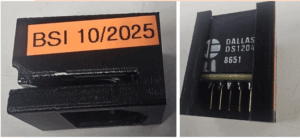
New Dallas Key
Physical Description
Question: What does the Dallas Security Key look like?
Answer: Approximate dimensions: 1.0 in × 1.0 in × 0.25 in
Licensed Options and How They Are Stored
Question: How did my Surfscan system originally obtain its options?
Answer:
- Options were purchased from KLA-Tencor at time of system sale
- These options correspond to licensed hardware and software features
Question: How are options written into the Dallas Key?
Answer: Two supported methods:
- Using proprietary software to program options directly into the key
- Using the original KLA-Tencor floppy disk supplied with the tool to reload options
Option Expansion or Changes
Question: Can I add options to my Surfscan tool later?
Answer:
- Contact KLA-Tencor to determine availability and pricing of option upgrades
- If OEM support is unavailable, contact Brumley South for assistance
Physical Description
Question: What does the Dallas Security Key look like?
Answer: Approximate dimensions: 1.0 in × 1.0 in × 0.25 in